Claude Code plugin marketplace · MIT

Plugins for Claude Code, mined from real sessions.

Test results above the prompt. Dashboards and videos built offline. iOS apps built, previewed and shipped from chat. Sessions that resume themselves after the 5-hour limit. A Copilot extension that asks before a cold prompt cache costs you. Eight plugins and two tools, each from a real job, each one line to install.

/plugin marketplace add abhijitbansal/claude-skills

Paste it into Claude Code, then /plugin install <name>@claude-skills for any plugin below. The skills also port to Codex and Copilot CLI.

8 plugins · 92 skills · 17 commands · 2 agents · 7 hooks · 1 CLI · 1 Copilot extension Tested on macOS and Ubuntu Markdown, shell and stdlib Python; portable-artifacts and the Cache Clock report need Node
Spotlight

Artifacts any agent can build, a cost guard for Copilot, and two lines above the prompt.

The newest work: five artifact skills, a Copilot extension and two mods. All of them run locally, and each is one line to install.

/make-motion “12-second teaser for a build tool called Relay, 1920x1080, in the dusk theme …” — rendered to a 1080p MP4 from a JSON spec: raised cards joined by arrows, a crossfade into a typed terminal line, a vignette and a light film grain. Its four sound cues are generated at render time, with no audio file and no voiceover; it plays muted here, so unmute to hear them.
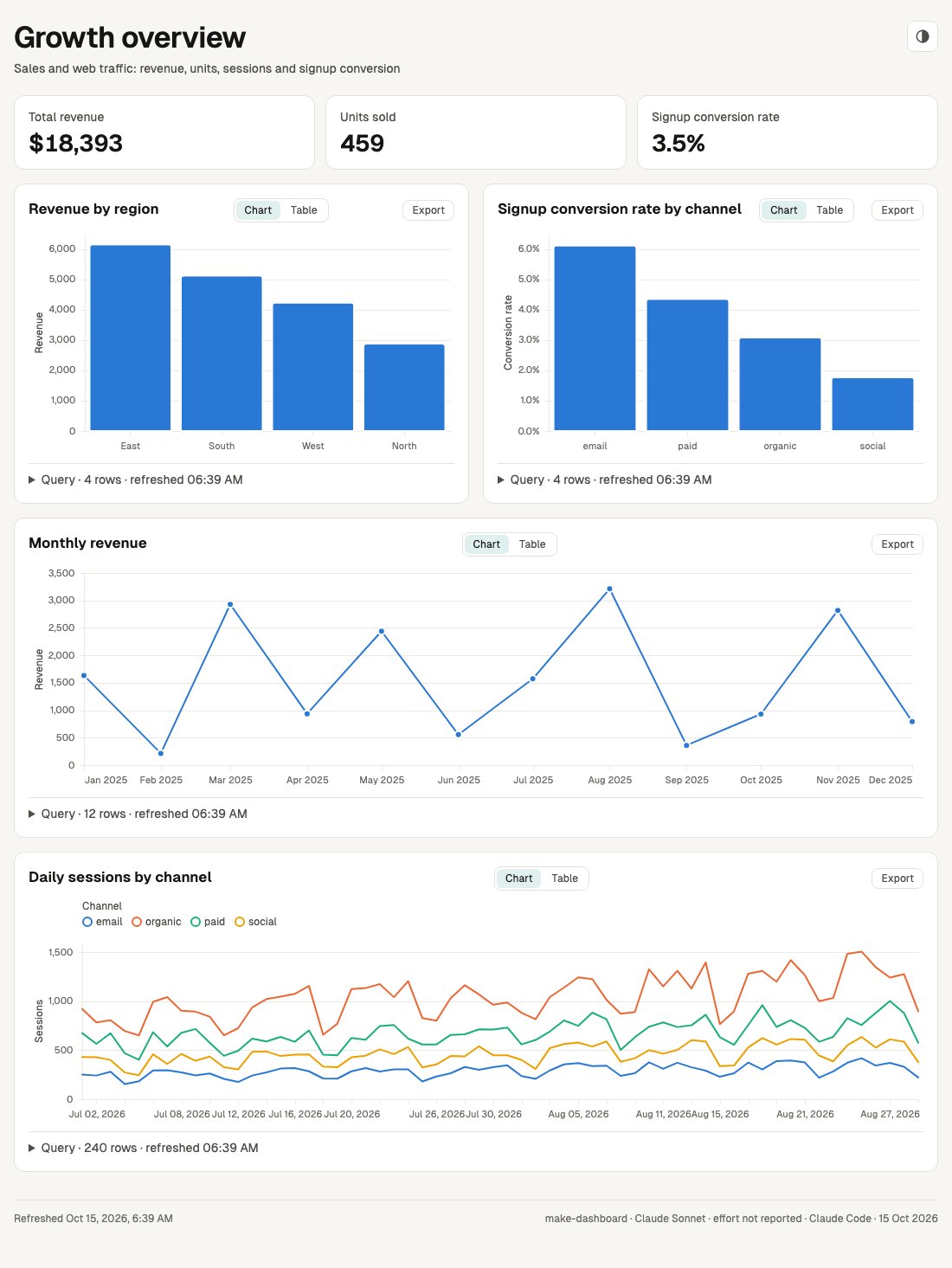
The Growth overview dashboard built by make-dashboard: four KPI tiles and four charts, each with a disclosure that shows its SQL
/make-dashboard “Growth overview from data/sales.csv and data/web_traffic.csv: KPI tiles, revenue by region …” — one self-contained HTML file.

portable-artifacts · /make-dashboard · /make-diagram · /make-explainer · /make-motion · /make-scene

Dashboards, diagrams, explainers, 3D scenes and videos, built offline by any agent

/make-dashboard turns a data file into one self-contained HTML page of KPI tiles and charts, and every chart expands to show its SQL, row count and refresh time. /make-diagram turns a prompt into an architecture diagram, flowchart, sequence or state diagram as one offline page with zoom, a story player, an Explore panel and full screen. /make-explainer turns a branch, an idea or a plan into one offline page or slide deck of typed sections (a verdict, numbers, files changed, a timeline, a test checklist that remembers its ticks), embedding diagrams, charts, 3D scenes and clips, and a linter rejects filler phrases and leftover placeholders before it builds. Its plan preset makes a page a reviewer answers in the browser (an option per decision, approve or changes, a verdict) and hands back as a checked plan-answers.json, or as the page itself saved with the answers inside. Numbers and their units stay on one line, and on Copilot and Codex a build can run on a cheaper model through an optional agent file. /make-motion turns a prompt into a live preview with a scrubber and a deterministic 1080p MP4, silent unless you ask for sound, then music from your file or a locally synthesised voiceover. /make-scene turns your data into an explorable 3D city, forest, galaxy or terrain, or lifts a diagram or chart into 3D, with a camera tour, as one offline page. Each page also carries a favicon, an icon theme toggle (except the make-motion preview) and a line saying which model, effort level and agent wrote it. Each skill's doctor reports anything missing before the first build. Tested live on this branch in Claude Code and GitHub Copilot CLI, and in an earlier eval on Codex CLI; Gemini CLI install paths are checked against its docs, not run live; make-scene passed its eval with 10/10 valid builds in one eval run (Claude Haiku in Claude Code, median 1.5 validate runs; results).

  1. Offline, and the same result every time. After a one-time install nothing touches the network except your own data files (and an image service, only if you opt in to make-explainer's --image-api), and the same spec always produces the same page or video (the build date in the page footer and a dashboard's refresh time aside). A spec that tries to reach the network is rejected.
  2. The model's whole job is one small JSON file. Writing a spec that matches a schema is easy work, so this runs on small and local models too. A mistake comes back as a precise message, for example charts[0].query: "rev_by_regin" not found; did you mean "rev_by_region"?, and the agent fixes one field instead of regenerating everything.
  3. Scripts do the rest. Plain Node scripts validate the spec, build the HTML page, run the preview and render the MP4. "Slow down scene 2" changes one field, so everything else stays exactly as it was. Needs Node 20; make-motion also needs Chromium and ffmpeg, and fetches the Kokoro voice model once if you ask for narration.
/plugin install portable-artifacts@claude-skills
npx skills add abhijitbansal/claude-skills --skill make-dashboard make-diagram make-explainer make-motion make-scene

Optional, on Copilot or Codex: a cheaper model for the builds. After an npx skills install, the skill's doctor offers to write a small artifact-builder agent file, or run it yourself (replace <skill-dir> with the installed skill folder):

node <skill-dir>/scripts/doctor.mjs --fix builder_agent
Cache Clock in 17 seconds: the clock, the price, and one question before a cold send.

cache-clock · GitHub Copilot CLI and VS Code

Know before a cold prompt cache costs you

Copilot bills tokens in AI credits, and a cache write costs far more than a read: 25× on Claude Sonnet 5.5, whose cache lives 5 minutes. Step away and the next message rewrites the whole conversation at the write price. Cache Clock shows that clock and that price, and asks before a costly cold send goes out.

  1. The clock. Every model call reports when its cache expires and what a read and a write cost. /cache-clock shows the time left and what the next send costs warm and cold; a heads-up comes just before expiry.
  2. The question. When the cache is cold and the rewrite costs at least $0.10 more than a warm send, it asks: Send anyway or Don't send. Don't send stops it before any model call, at 0 AI credits. It asks once per cold cache.
  3. The report. report.mjs reads every saved Copilot session and totals what cold sends already cost you, per model.
curl -fsSL https://raw.githubusercontent.com/abhijitbansal/claude-skills/main/tools/cache-clock/install.sh | sh
curl -fsSL https://raw.githubusercontent.com/abhijitbansal/claude-skills/main/tools/cache-clock/install.sh | sh -s -- --project # VS Code: run in each repo

Then /cache-clock help in Copilot CLI. For VS Code's Copilot chat, install it into each repo instead (the second line, ending in sh -s -- --project: it copies the extension to .github/extensions), set "chat.canvases.enabled": true in VS Code settings, then type /cache-clock in full: it works, but VS Code does not list it in the / menu.

If /cache-clock does nothing after installCopilot CLI may still need experimental mode before it loads the extension. Run /experimental on, reload Copilot CLI, and accept the permission prompts when it asks.
/experimental on
session-compass band, then the test-board bandsample values

test-board · session-compass · mods

Two lines above the prompt

test-board shows passed, failed and skipped counts after every test run, next to the previous run of the same suite in the same worktree. session-compass shows what a session is building, where it stands and what it has produced when you come back to it, and /compass opens the full list.

  1. What you see. One line per mod above the prompt. test-board: the counts of the last run, the change in failures against the run before, the time it finished, and via which subagent ran it. It closes itself an hour after the run, or sooner with ✕. session-compass: repo, branch, goal, current step and what the session has produced, always up and updated as the session moves.
  2. Where it comes from. Nothing is asked of the model. test-board reads the output of test commands it recognises (pytest, jest, xcodebuild … test, cargo test and more) and keeps the last 10 runs per suite. session-compass records commits, pushes, pull requests and published files as tool calls succeed, and the model sets the goal through one small tool.
  3. How it is built. A mod is a plugin written as TypeScript hooks that wrap Claude Code's own behaviour: each hook sees a tool call before it runs and the result after, and passes both through unchanged. Each band draws its line and then whatever the next hook drew, so mods stack. Everything stays on your machine; neither mod makes a model call.
/plugin install test-board@claude-skills
/plugin install session-compass@claude-skills
Plugins

The rest, by what they do.

Every plugin is self-contained and installs on its own. Each row ends with its install line and a guide that covers usage and internals.

ios-dev

59 skills · 6 commands

Build, preview and ship iOS apps from chat, with the simulator screenshot delivered to your phone.

edit → /preview → simulator build → screenshot → iCloud Drive + iMessage ping → /fix → /release → TestFlight or App Store

/plugin install ios-dev@claude-skills
ios-dev guide
  • /ios-init writes .claude/app.yml once: scheme, bundle ID, team, URL scheme. Every other command reads it.
  • /preview builds on the booted simulator, launches, deep-links and screenshots, then drops the image in iCloud Drive and pings your iPhone over iMessage. /fix applies a UI change and proves it the same way.
  • /release runs a gated pre-flight, a Fastlane build and upload to TestFlight or the App Store, then tags the release; App Store mode can also deploy the marketing site.
  • Dozens of skills mined from real app bugs: Swift 6 MainActor traps, SwiftData with CloudKit, Vision OCR grounding, launch watchdogs, widget bridges.

core-workflow

19 skills · 4 commands · 2 agents · 1 hook

The workflow layer: commits, lessons that become skills, branch explainers and two worker agents.

/learn → dedupe against the catalog → draft the skill → PR → merged → every repo on the next update

/plugin install core-workflow@claude-skills
core-workflow guide
  • commit stages, runs shellcheck and writes a conventional commit from the diff. A hook lints shell scripts after every edit.
  • /learn captures a lesson from the session as a new or extended skill and opens a PR; once merged, every other repo inherits it on the next plugin update. /contribute-skill does the same for any change.
  • /explain-branch writes a self-contained HTML explainer of the branch. /team decides whether a task deserves an agent team, and says no when it does not.
  • Agents image-parser and web-researcher take screenshots and documentation lookups out of the main context.

prompt-craft

7 skills · 6 hooks

Turns a rough ask into a spec before any work starts, then suggests the next command.

/plugin install prompt-craft@claude-skills
prompt-craft guide
  • /improve-prompt restates the goal, writes acceptance criteria and surfaces the assumptions to confirm. /plan decomposes the task with per-step criteria.
  • debug, refactor and review lenses keep execution disciplined: reproduce first, tests before and after, findings ranked by severity.
  • A Stop hook ranks the next command from relevance, history and git state. Secret and format guardrails are opt-in and off by default.

second-wind

1 skill · 1 command · CLI · stdlib Python, no dependencies

Runs Claude Code overnight. When the 5-hour limit pauses a session, the wind CLI waits for the reset and resumes every tmux session.

/plugin install second-wind@claude-skills
curl -fsSL https://raw.githubusercontent.com/abhijitbansal/claude-skills/main/tools/second-wind/install.sh | sh
second-wind guide · CLI reference
  • wind init picks repos, wind up launches a tmux session per repo, wind watch polls every pane.
  • When the usage-limit message appears, wind parses the reset time, waits, then nudges every session.
  • wind dash serves a live localhost dashboard with a per-run CSRF token.

cache-clock

Copilot extension · CLI and VS Code · no npm dependencies

A prompt-cache clock for GitHub Copilot CLI and VS Code's Copilot chat. It shows when the cache goes cold and what the next send costs, and asks before a costly cold send goes out.

assistant.usage → clock per model → prompt submitted → cold and costly? → Send anyway / Don't send (0 AI credits)

curl -fsSL https://raw.githubusercontent.com/abhijitbansal/claude-skills/main/tools/cache-clock/install.sh | sh
node ~/.copilot/extensions/cache-clock/report.mjs --since 7d
cache-clock guide · visual explainer
  • Reads expiry, TTL and per-token prices from Copilot's own assistant.usage events. Through Copilot, a Claude Sonnet 5.5 cache write costs 25× a read and the cache lives 5 minutes.
  • /cache-clock shows the card: time left, warm vs cold price, session tally. A heads-up appears just before expiry.
  • The report reads every persisted Copilot session and totals what cold sends already cost. In VS Code it needs "chat.canvases.enabled": true.

linear-pm

1 skill · 6 commands

Makes Linear the operational centre: /linear-pick implements agent-ready issues end to end, and three autonomy modes gate what agents may touch. Guide

Everything, searchable

92 skills · 17 commands · agents · hooks · CLI

The catalog lists every skill, command, agent, hook and CLI tool with a search box and type filters, each linked back to the plugin it ships in. Open the catalog

How it works

A plugin is a folder.

One marketplace file lists the plugins. Each plugin is a directory of Markdown and scripts that Claude Code reads on install. Nothing is compiled.

.claude-plugin/marketplace.json   lists the 8 plugins

plugins/ios-dev/
├─ .claude-plugin/plugin.json    name, version, description
├─ skills/app-preview/SKILL.md   loaded when a task matches
├─ skills/release/SKILL.md
├─ commands/preview.md           becomes /preview
└─ commands/release.md           becomes /release

plugins/core-workflow/
├─ hooks/hooks.json              PostToolUse → shellcheck
└─ agents/web-researcher.md      a subagent

plugins/test-board/
└─ hooks/register.tsx            a mod: TypeScript hooks

adapters/install.sh               ports skills/ elsewhere
marketplace/plugin marketplace add registers this repo. Each /plugin install copies one plugin folder and registers what it contains. Nothing else on the machine changes.
skills/A folder with a SKILL.md. Claude loads it when a task matches its description, or when you type its name as a slash command. Scripts and reference files ship next to it.
commands/One Markdown file per slash command, holding the prompt it runs.
hooks/Shell scripts wired to events in hooks.json: lint on every edit, suggest the next command when a turn ends, block a commit that contains a secret.
agents/Markdown definitions of subagents with their own tools and model, for work that should not fill the main context.
modsTypeScript function hooks that wrap Claude Code's own behaviour and can draw a band above the prompt or open a pane. test-board and session-compass are mods.
other agentsadapters/install.sh writes the same skills into Codex, Copilot CLI or an AGENTS.md agent. setup/setup.sh rebuilds a whole machine from one TOML file; the machine-setup runbook has the round trip.

Full detail, with every file: the architecture overview.

Install

Three ways in.

Claude Code is the main path. The marketplace itself is Markdown and shell; portable-artifacts needs Node 20, the Second Wind CLI is one stdlib Python file, and the Cache Clock report needs Node 18.

Claude Code

Inside any session. Install only what you need; each plugin is self-contained.

/plugin marketplace add abhijitbansal/claude-skills
/plugin install ios-dev@claude-skills
/plugin install test-board@claude-skills
/plugin install portable-artifacts@claude-skills

Other agents

Wire the same skills into Codex, Copilot CLI or any AGENTS.md agent from a checkout of the repo.

git clone https://github.com/abhijitbansal/claude-skills
cd claude-skills
bash adapters/install.sh codex
bash adapters/install.sh all # every target

Second Wind CLI

Standalone, no checkout needed. Works with or without the plugins.

curl -fsSL https://raw.githubusercontent.com/abhijitbansal/claude-skills/main/tools/second-wind/install.sh | sh
wind init # pick repos
wind up && wind watch # run + auto-resume

Seeding a whole machine instead? Run setup/setup.sh and follow the machine-setup runbook.

Go deeper

Guides and references.

CatalogEvery skill, command, agent, hook and CLI tool, searchable and filterable.
ArchitectureHow the marketplace, the plugins, the Second Wind CLI, the Cache Clock extension, the adapters and the machine setup fit together.
Machine setupRebuild a Claude Code environment on a new machine from one TOML manifest: capture.sh snapshots, setup.sh restores, contribute.sh round-trips changes back.
Second Wind CLIEvery wind command, the live dashboard, how limit detection parses the reset time, the config schema and the security model.
Cache ClockThe Copilot CLI cache guard: the visual explainer, the architecture diagram, measured TTLs and prices, and the cold-send report.
Usage guideThe project's how-to guide on GitHub, including contributing a skill back.